Subway Gift Card Invalid PIN Problem: Few things are more frustrating than loading up your favorite Subway meal, entering your gift card information, and suddenly seeing an “Invalid PIN” message. Whether you’re checking your balance online, paying through the Subway app, or placing an order on the website, this error can leave you wondering if your gift card is broken or if your money is gone.
The good news is that, in most cases, an invalid PIN doesn’t mean your gift card has lost its value. It usually points to a verification issue that can often be fixed in just a few minutes. Common causes include entering the wrong PIN, using an inactive card, scratching the protective coating too aggressively, or experiencing a temporary system issue. According to Subway’s official gift card documentation, every physical gift card includes a unique card number and PIN used for online balance checks and account verification, while eGift cards receive their PIN in the delivery email. Subway also states that gift card balances generally do not expire in the U.S., making it worthwhile to troubleshoot the issue rather than assuming the card is unusable.
This guide explains every likely reason behind the Subway Gift Card Invalid PIN Problem, walks you through practical troubleshooting steps, and shows you when it’s time to contact Subway customer support. By the end, you’ll know exactly what to do next without wasting hours searching through forums or guessing at random fixes.
What Does “Invalid PIN” Mean on a Subway Gift Card?
Quick Answer
An invalid PIN simply means the Subway system could not verify the security code linked to your gift card. The issue may be caused by an incorrect PIN, a card activation problem, damage to the PIN area, or a temporary verification error.
When people first see this message, they often assume the gift card has no balance left. In reality, that’s rarely the case. The PIN is designed as an extra security layer that helps confirm ownership when checking balances online or redeeming the card digitally. If the system cannot match the PIN with the associated card number, it blocks the transaction until the information is verified.
For physical Subway gift cards, the PIN is usually hidden beneath a silver scratch-off panel on the back of the card. If that panel is scratched too hard, important digits can become unreadable. Digital gift cards work a little differently because the PIN is included in the email you receive after purchase. Copying extra spaces or mistyping characters can also trigger an invalid PIN error. Subway’s official terms confirm that both the card number and PIN are required for online verification and customer service inquiries.
The important thing to remember is that an invalid PIN message is generally a verification issue, not proof that the gift card balance has disappeared.
Why Your Subway Gift Card PIN Isn’t Working?
Several different situations can trigger this message, and identifying the correct one will save you time.
System Verification Errors
Sometimes the problem isn’t your gift card at all. Like any online payment platform, Subway’s website and mobile app occasionally experience temporary server issues. During these periods, even correctly entered gift card details may fail verification. Users have reported intermittent app-related payment and redemption issues that were resolved after retrying later or using another ordering method.
If you’ve entered everything carefully and still receive the same error, try waiting a few minutes before trying again. Switching from the mobile app to the official website—or vice versa—can also help rule out a platform-specific glitch.
User Input Mistakes
Human error is far more common than people realize. A single incorrect digit in either the card number or PIN will cause the verification process to fail.
Pay special attention to:
- Numbers that look similar
- Missing digits
- Accidental spaces when copying from an email
- Entering the card number into the PIN field
- Using an old screenshot instead of the current gift card
Taking an extra minute to verify every character often solves the problem immediately.
Common Reasons for an Invalid Subway Gift Card PIN
| Possible Cause | Solution |
|---|---|
| Incorrect PIN entered | Re-enter carefully |
| Card not activated | Contact the retailer or Subway support |
| PIN scratched off | Keep your receipt and contact support |
| Temporary website issue | Try again later or use another device |
| Wrong card number | Double-check every digit |
| Digital gift card copy error | Paste without extra spaces |
Card Was Never Activated
One of the most overlooked causes is a gift card that was never activated during purchase. This can happen if the cashier forgets to complete activation or if there’s a technical issue during checkout. Until activation is successful, the Subway system cannot validate the PIN or recognize the card balance. Subway advises purchasing gift cards only from authorized sellers and participating restaurants to reduce the risk of activation problems.
If you purchased the card recently, keep your receipt. The retailer may be able to confirm whether activation was completed correctly.
The PIN Was Damaged
The protective silver coating is meant to hide the PIN until you’re ready to use it. Unfortunately, scratching too hard with a coin or other sharp object can remove parts of the printed digits.
If only one or two numbers are unclear, avoid guessing repeatedly, as multiple failed attempts can complicate troubleshooting. Instead, save the card and your purchase receipt, then contact Subway support for assistance.
You’re Using the Wrong Card Number
Many customers accidentally type the wrong sequence because gift cards contain multiple numbers printed on the card.
Always make sure you’re entering:
- the full gift card number,
- the matching PIN,
- and not any barcode or serial number printed elsewhere on the card.
It sounds simple, but it’s one of the most common reasons the system rejects otherwise valid gift cards.
How to Fix the Subway Gift Card Invalid PIN Problem
Quick Answer
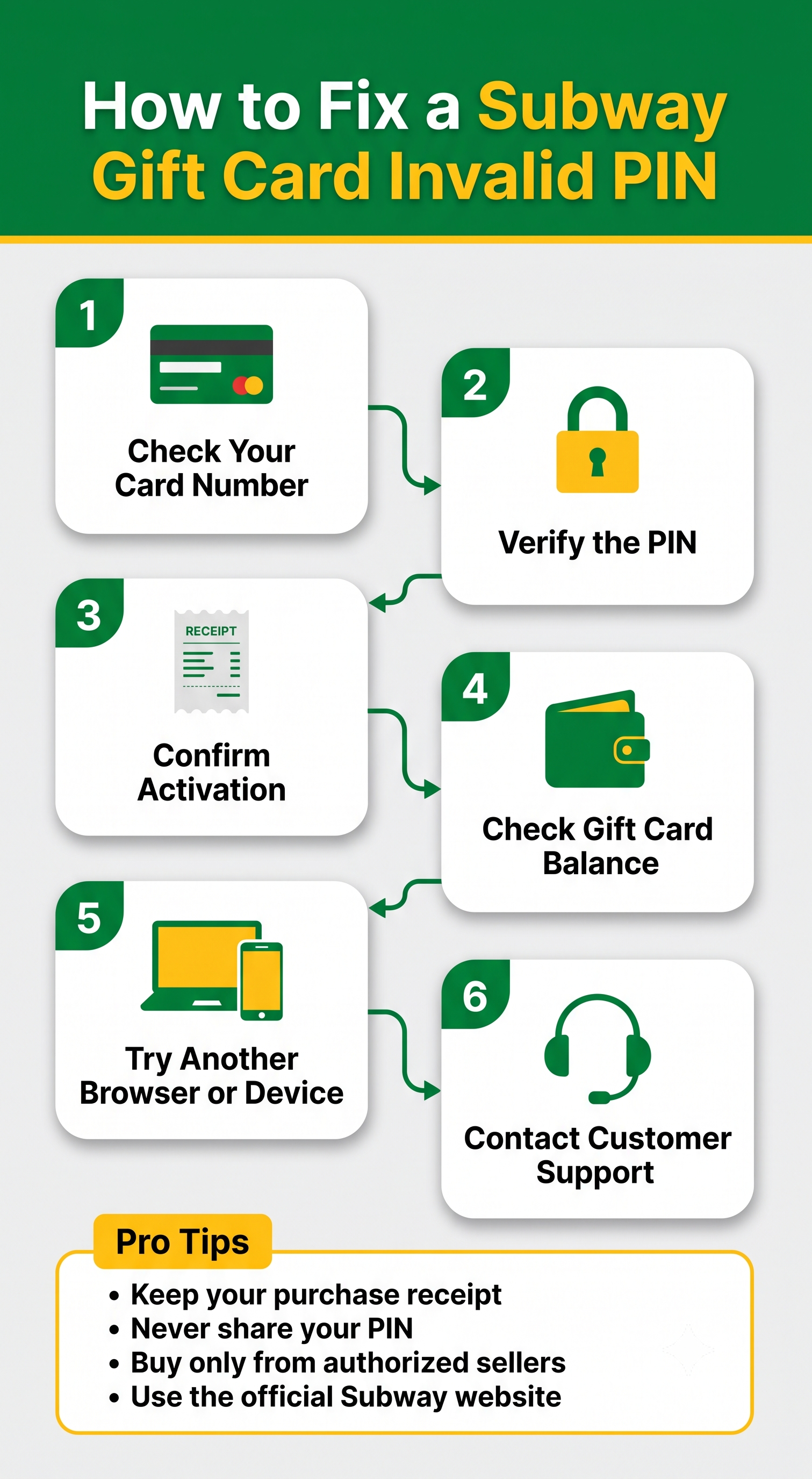
If your Subway gift card PIN isn’t working, start by verifying the card number and PIN, confirm the card was activated, try checking the balance from the official Subway website, test another browser or device, and contact Subway customer support if the problem continues. Most PIN issues are caused by simple input mistakes, activation delays, or temporary verification errors rather than a lost balance.
The following steps cover the most effective troubleshooting methods based on common customer experiences and official Subway guidance.
Step 1: Double-Check the Card Number and PIN
Before assuming there’s a serious problem, carefully inspect every number you’ve entered. It sounds obvious, but one incorrect digit is enough to trigger an “Invalid PIN” message.
If you’re using a physical card:
- Enter the full card number exactly as printed.
- Type the PIN carefully after scratching off the protective coating.
- Avoid confusing similar-looking numbers like 0 and 8 or 1 and 7.
- Don’t include spaces or extra characters.
If you’re using a Subway eGift card, copy the PIN directly from the email. Sometimes extra spaces are accidentally copied along with the code, so it’s worth pasting the PIN into a text editor first before entering it on the Subway website.
Many users solve the issue simply by slowing down and entering the information one character at a time.
Step 2: Confirm the Gift Card Was Activated
A gift card purchased from a grocery store, pharmacy, or retail chain isn’t usable until it’s activated at checkout.
If activation didn’t complete successfully, Subway’s system won’t recognize either the card number or the PIN.
Signs your card may not be activated include:
- The card has never worked.
- You received the error immediately after purchase.
- The cashier experienced register issues.
- You never received an activation receipt.
If you still have the purchase receipt, compare the information printed on it with your gift card. The retailer can often verify whether activation was completed successfully.
When buying Subway gift cards, always purchase them from trusted retailers or participating Subway restaurants to reduce activation issues.
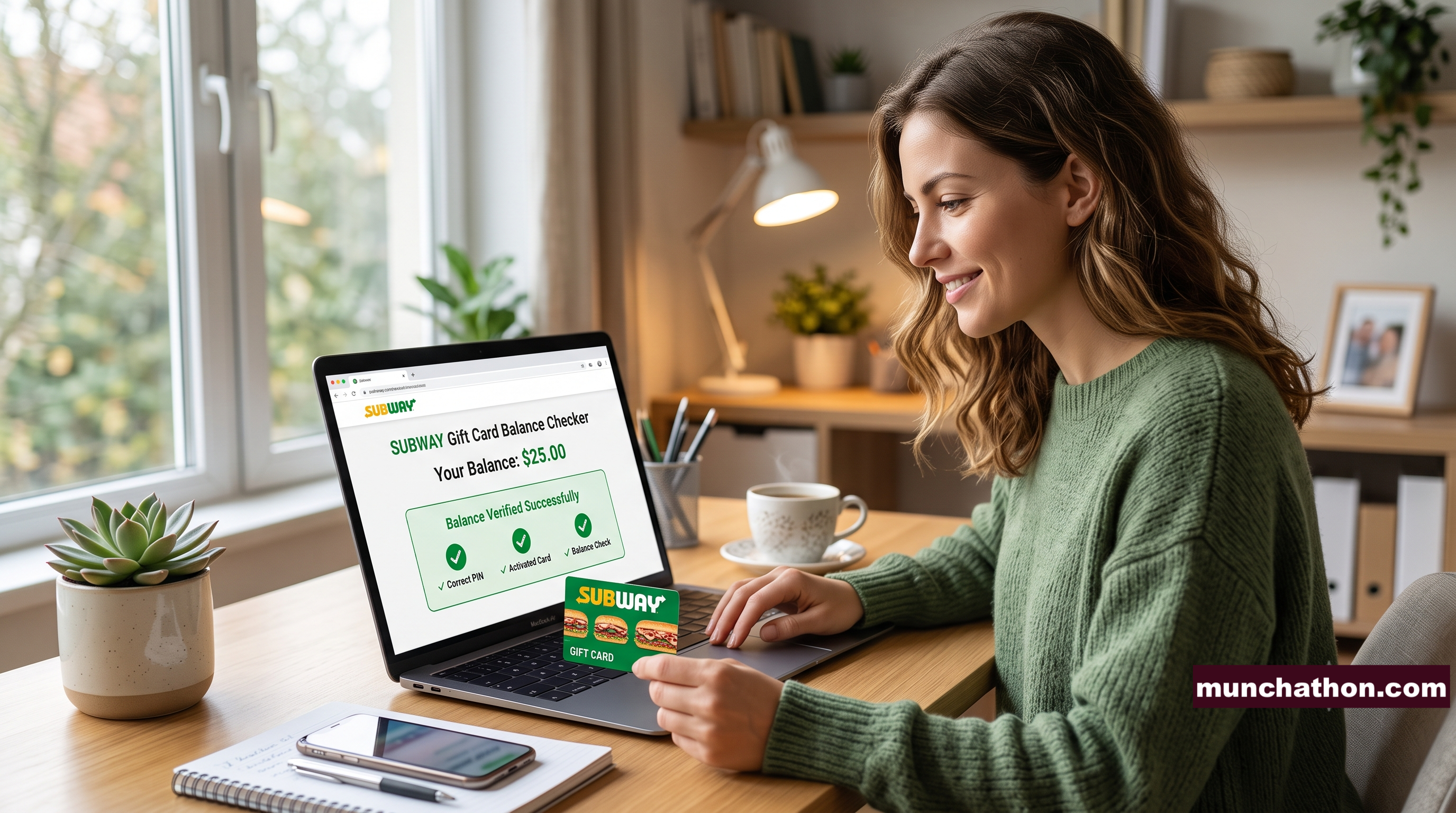
Step 3: Check Your Balance Through the Official Subway Website
Instead of trying to redeem the card immediately, check whether Subway’s balance checker recognizes your card.
If the balance checker displays your remaining balance, then the card itself is likely valid, and the problem may only involve the redemption process or the platform you’re using.
If the website cannot verify the PIN either, you’ll have narrowed the issue considerably before contacting customer support.
Avoid using unofficial gift card checking websites. They may display outdated information or expose your card details unnecessarily.
Step 4: Try Another Device or Browser
Sometimes the issue isn’t the gift card at all.
Browser extensions, autofill settings, outdated cookies, or temporary website glitches can interfere with online verification.
Try these quick fixes:
- Switch from Chrome to Edge or Firefox.
- Try another phone or computer.
- Clear your browser cache.
- Disable autofill temporarily.
- Use the Subway mobile app if the website isn’t working.
- Try the website if the app gives an error.
These simple changes often resolve technical verification issues without requiring support.
How to Check Your Subway Gift Card Balance?
Checking your gift card balance is straightforward once your PIN is recognized.
Typically, you’ll need:
- Your Subway gift card number
- The PIN
- Internet access
After entering both pieces of information on the official balance checker, you’ll see your available balance almost instantly.
If the balance displays correctly but payment still fails during checkout, the issue may involve the ordering platform rather than the gift card itself.
For in-store purchases, Subway employees can often check your remaining balance directly at the register.
Where to Find the PIN on a Subway Gift Card?
Finding the PIN depends on the type of gift card you own.
Physical Gift Card
The PIN is located on the back beneath a scratch-off security panel.
Use a coin gently to remove the covering. Scratching too aggressively can damage the printed numbers underneath.
Digital Subway Gift Card
The PIN appears inside the email delivered after purchase.
If you cannot locate the PIN:
- Search your email inbox.
- Check your spam folder.
- Verify you’re looking at the correct gift card email.
- Ensure you’re using the latest email if multiple cards were purchased.
Digital gift cards eliminate scratching issues but introduce copying mistakes, especially when users accidentally include spaces.
Also Read:
- Subway Gift Card Not Working? Here’s How To Fix It!
- Mysubwaycard: Register, Activate & Check Balance At www.mysubwaycard.com
- MySubwayCard: Registration, Login, Activation And Check Balance Guide!
- www.mysubwaycard.com – How To Register & Login Subway Gift Card Online
- Mysubwaycard Login, Registration, Activation And Check Balance At www.mysubwaycard.com
- Mysubwaycard Guide, FAQ & Get Online Benefits – Subway Sandwiches Rewards Card
- What Is Subway Gift Card And How To Check Subway Gift Card Balance?
- Subway Live IQ: Login, Customer Support & Administration Module Guide!
- Tellsubway: Participate The Subway Customer Satisfaction Survey Online!
- Subway Breakfast Menu With Prices, Hours, Nutrition Value & Customer Support!
- Subway Menu With Prices In Canada, Hours, Specials, And Nutrition Facts!
- What Is Subway Gift Card And How To Check Subway Gift Card Balance?
Physical Gift Card vs. Digital Gift Card PIN Issues
Although both types work similarly, the problems users experience are often different.
| Gift Card Type | Common Issue | Recommended Fix |
|---|---|---|
| Physical Card | PIN scratched or unreadable | Contact support with receipt |
| Physical Card | Activation issue | Verify purchase with retailer |
| Digital Card | Copy/paste error | Remove extra spaces |
| Digital Card | Wrong email used | Locate original purchase email |
| Either Card | Website verification issue | Try again later or use another browser |
Knowing which category your card falls into makes troubleshooting much easier.
What If Someone Scratched Off the PIN?
A scratched-off PIN doesn’t automatically mean your gift card is unusable.
If the numbers remain readable, enter them carefully.
If important digits are missing:
- Don’t guess repeatedly.
- Save the physical card.
- Keep your purchase receipt.
- Take clear photos of both sides of the card.
- Contact Subway customer support.
Support representatives may ask for identifying information printed elsewhere on the card to help verify ownership.
Throwing away the card before contacting support is one of the biggest mistakes customers make.
Can an Expired Subway Gift Card Cause an Invalid PIN?
For most U.S. Subway gift cards, expiration isn’t usually the reason behind an invalid PIN.
Many Subway gift cards don’t expire, although promotional cards or certain regional offers may include separate terms and conditions.
Instead of assuming expiration is responsible, investigate more common causes such as:
- Incorrect PIN
- Activation problems
- Website verification errors
- Damaged card
- Typing mistakes
If you’re unsure about your specific card, customer support can confirm its status.
Can You Still Use the Gift Card Without the PIN?
It depends on how you’re using it.
Online Orders
Generally, you’ll need both the card number and PIN.
In-Store Purchases
Many participating Subway restaurants can process payments by scanning or entering the card number, even when online balance verification isn’t available.
Policies can vary by location, so it’s worth asking the cashier before assuming the card can’t be used.
If your PIN is unreadable but the card number remains intact, an in-store purchase may still be possible.
When Should You Contact Subway Customer Support?
If you’ve completed all troubleshooting steps and still receive an invalid PIN error, it’s time to contact support.
You should reach out if:
- The PIN isn’t readable.
- The card won’t activate.
- The balance checker cannot verify the card.
- Your digital gift card email contains an invalid PIN.
- Your balance disappeared unexpectedly.
- The retailer confirmed activation, but the card still fails.
Customer support has access to tools unavailable to customers and can investigate activation history, card status, and verification problems.
Information You’ll Need Before Contacting Support
Having the right information ready helps resolve the issue much faster.
Prepare:
- Gift card number
- PIN (if readable)
- Purchase receipt
- Date of purchase
- Store location
- Payment method
- Photos of the front and back of the card
- Screenshot of any error messages
Providing complete information during your first conversation often eliminates unnecessary follow-up requests.
Common User Mistakes
Even a small mistake can cause a Subway gift card PIN not working error. Many customers assume the gift card is defective when the real problem is something much simpler. Taking a few extra minutes to verify the information can often save you from contacting customer support.
Here are some of the most common mistakes people make:
- Entering the card number instead of the PIN.
- Typing one or more digits incorrectly.
- Confusing similar-looking numbers, such as 0 and 8 or 1 and 7.
- Copying extra spaces when pasting a PIN from an email.
- Trying to use a gift card before it has been activated.
- Using an unofficial balance checker instead of Subway’s official website.
- Throwing away the purchase receipt too soon.
- Scratching the PIN too aggressively and damaging the printed code.
- Assuming the card has expired without verifying its status.
- Repeatedly entering the wrong PIN instead of checking the information carefully.
If you slow down and verify each detail before trying again, you’ll avoid many of the issues that trigger an invalid PIN message.
Safety Tips to Avoid Gift Card Scams
Gift card scams continue to grow every year, making it more important than ever to protect your Subway gift card information. While Subway gift cards are convenient, scammers often target customers by stealing card numbers or tricking them into sharing PINs.
Follow these best practices to keep your gift card secure:
- Buy Subway gift cards only from authorized retailers or participating Subway restaurants.
- Never share your gift card number or PIN with someone you don’t trust.
- Avoid purchasing gift cards from online marketplaces or auction sites.
- Check that the scratch-off coating hasn’t already been removed before purchasing a physical card.
- Save your purchase receipt until the entire balance has been used.
- Be cautious of emails, texts, or phone calls asking for your gift card information.
- Always use the official Subway website when checking your gift card balance.
- If you believe your gift card has been compromised, contact Subway customer support immediately.
Treat your gift card like cash. Anyone with both the card number and PIN may be able to use the remaining balance.
Final Thoughts
A Subway Gift Card Invalid PIN Problem can be frustrating, but in most cases, it’s also fixable. The issue is often caused by simple mistakes such as entering incorrect numbers, activation delays, damaged PINs, or temporary verification errors rather than a lost balance.
Before assuming your gift card is unusable, take a few minutes to work through the troubleshooting steps covered in this guide. Double-check the card details, verify activation, try another browser or device, and use Subway’s official balance checker. If the problem still isn’t resolved, Subway customer support can help investigate the card’s status.
Bookmark this guide so you’ll always have a reliable reference the next time you experience a Subway gift card issue—or if a friend or family member needs help with the same problem.
Frequently Asked Questions (FAQs)
1. Why does my Subway gift card say “Invalid PIN”?
This usually means the PIN couldn’t be verified. Common causes include entering the wrong PIN, activation issues, a damaged PIN, or a temporary website or app error.
2. Can I still use my Subway gift card if the PIN doesn’t work?
In some cases, yes. Many participating Subway restaurants can process a physical gift card in-store even if you’re unable to check the balance online. Policies may vary by location.
3. Where can I check my Subway gift card balance?
You should always use Subway’s official gift card balance checker or ask a cashier at a participating Subway restaurant.
4. What should I do if the PIN is scratched off?
Keep the gift card and your purchase receipt, avoid guessing the missing numbers, and contact Subway customer support for assistance.
5. Do Subway gift cards expire?
Most Subway gift cards issued in the United States do not expire, although promotional cards or regional offers may have different terms.
6. How do I know if my Subway gift card was activated?
If the card consistently shows an invalid PIN immediately after purchase, contact the retailer with your receipt to confirm whether activation was completed successfully.
7. Why does my digital Subway gift card PIN not work?
The most common causes are typing mistakes, extra spaces copied from the email, or entering the wrong gift card information.
8. Can Subway customer support recover my gift card?
If you can provide proof of purchase and the card information, customer support may be able to verify the card and help resolve certain issues.
9. Is it safe to check my Subway gift card balance online?
Yes, as long as you use Subway’s official website. Avoid third-party gift card balance websites whenever possible.
10. Can an incorrect card number cause an invalid PIN error?
Absolutely. The card number and PIN are linked together. If either one is entered incorrectly, the verification process will fail.